
Top Stories
Open-Source Xournal++ Surges Ahead of OneNote for Digital Note-Takers

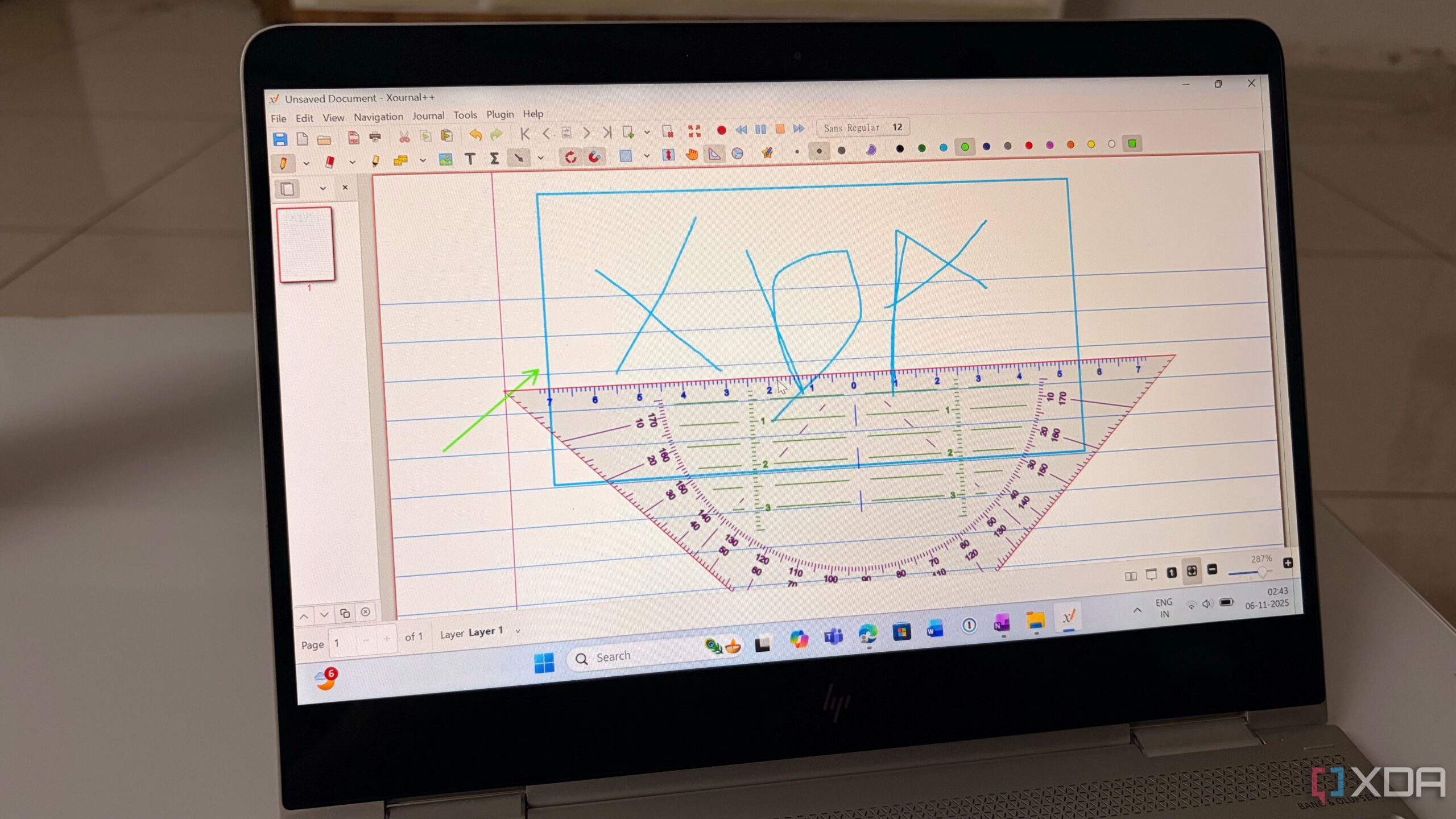
UPDATE: The open-source note-taking app Xournal++ has just surged in popularity, emerging as a leading alternative to Microsoft OneNote for digital ink enthusiasts. If you’re tired of OneNote’s limitations, Xournal++ offers a powerful suite of features that could elevate your note-taking experience.
In a world where precision is paramount, Xournal++ is redefining productivity. Users are no longer restricted by unpredictable palm rejection or a rigid infinite canvas that complicates printing. This open-source powerhouse is engineered specifically for those who rely heavily on digital ink and demand more than just acceptable tools.
Xournal++ transforms handwriting into vector data, allowing users to zoom in without losing clarity. This is a game-changer for professionals creating detailed diagrams or complex mind maps. In contrast, OneNote’s flat page layout can lead to frustrating mishaps, such as accidentally erasing text while trying to delete a highlighter stroke.
The app introduces a sophisticated layering system, akin to advanced design software like Adobe Illustrator. Users can create multiple layers for different annotations and easily hide or lock them, enhancing workflow flexibility. Once you adapt to this system, going back to OneNote feels impossible.
Xournal++ also excels in geometry and shape recognition. Users can seamlessly transform rough sketches into precise shapes, making it ideal for creating professional-looking graphs and diagrams. This level of precision ensures that your notes won’t just be functional; they’ll impress colleagues and clients alike.
Another standout feature is Xournal++’s superior PDF annotation capabilities. Unlike OneNote, which treats PDFs as mere images, Xournal++ integrates them as a fixed background layer. This means users can annotate documents with ease, keeping personal notes separate from formal edits, and export them as clean PDFs that look polished and professional.
Customization is another area where Xournal++ shines. Users can tailor their toolbars to fit their specific workflows, saving valuable time. After a brief setup, you can access your most-used tools effortlessly, optimizing your productivity.
However, it’s important to note that Xournal++ currently has limitations. It is primarily available on desktop platforms, leaving mobile note-takers searching for alternatives. Additionally, while OneNote may not win awards for user interface, Xournal++’s design feels outdated and in need of a significant revamp by 2026.
Overall, if you prioritize precision and performance, Xournal++ emerges as a top-tier choice for digital note-taking. Don’t let OneNote’s shortcomings hold you back any longer; download Xournal++, grab your stylus, and experience the difference today.
For those embedded in the Apple ecosystem, consider checking out Craft, another robust note-taking app worth exploring. Share this news with fellow digital ink enthusiasts who are ready to upgrade their note-taking game!

Urgent Swatting Incident Ties Up Emergency Resources in Alabama

Urgent Tax Alert: Claim Your Deductions Before April 15!

Scientists Investigate Cosmic Defects: Where Are They Now?

Spring Bocce Leagues Open Registration in Rapid City

CALV Offers Essential Communication Class for Real Estate Pros

Samsung Galaxy Watch 9 Set for Larger 435mAh Battery Upgrade

Healthy Choice Wellness Reports Earnings, Stock Sees Uptick

Prince Harry Claims to Be ‘Antidote to Andrew’ Amid Royal Crisis

Pet Owners Weigh Kibble Against Fresh Dog Food Options

ALMA Discovers Companion Orbiting Giant Star π 1 Gruis

U.S. Visa Rescheduling Hits H‐1B Applicants as New Vetting Rules Take Effect

University of Hawaiʻi Joins $25.6M AI Project for Disaster Monitoring

F-22 Raptor vs. Su-57 Felon: A 2025 Fighter Jet Comparison

Recent Divorce Judgments from Iberia Parish Court Records

Ohio State Study Uncovers Brain Connectivity and Function Links

Prince Andrew Faces Fallout from Scandals and Allegations

Urgent: Flight Cancellations Loom at Texas Airports Amid Shutdown

Frank Dunn, Esteemed Builder and Community Leader, Passes Away at 89
-
 Science8 months ago
ALMA Discovers Companion Orbiting Giant Star π 1 Gruis
-
 Politics6 months ago
U.S. Visa Rescheduling Hits H‐1B Applicants as New Vetting Rules Take Effect
-
Science8 months ago
University of Hawaiʻi Joins $25.6M AI Project for Disaster Monitoring
-
 World8 months ago
F-22 Raptor vs. Su-57 Felon: A 2025 Fighter Jet Comparison
-
 Politics8 months ago
Recent Divorce Judgments from Iberia Parish Court Records
-
 Science9 months ago
Ohio State Study Uncovers Brain Connectivity and Function Links
-
 World9 months ago
Prince Andrew Faces Fallout from Scandals and Allegations
-
 Top Stories8 months ago
Urgent: Flight Cancellations Loom at Texas Airports Amid Shutdown
-
 Lifestyle8 months ago
Frank Dunn, Esteemed Builder and Community Leader, Passes Away at 89
-

 Business8 months ago
Appian Recognizes 2025 Partner Award Winners for Enterprise Innovation
-

 Entertainment7 months ago
Malachi Barton Tops Google Searches as Disney’s Rising Star of 2025
-

 Top Stories7 months ago
Republican Matt Van Epps Wins Tennessee Special Election