
Health
Adjusting Monitor Height Essential for Ergonomic Workspaces

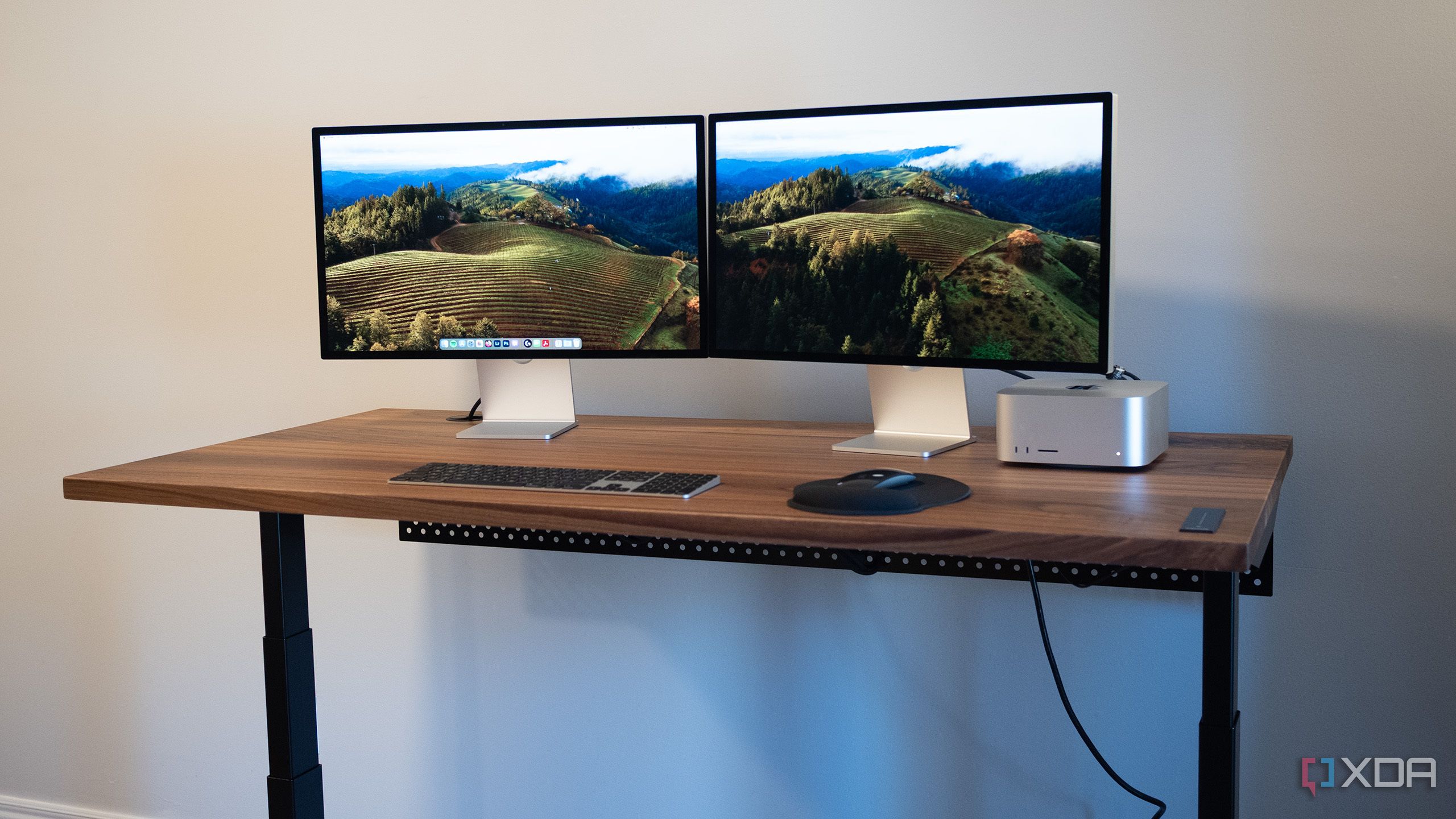
The effectiveness of standing desks in enhancing workplace ergonomics may be compromised if monitor height is not properly adjusted. Health experts emphasize that simply transitioning to a standing desk does not automatically alleviate the discomfort associated with prolonged computer use.
Many individuals are drawn to standing desks as a solution to the negative effects of extended sitting. According to a report from the American Journal of Public Health, the rise in remote work has led to an increase in reports of musculoskeletal issues among home office workers. A significant number of these complaints can be traced back to improper workstation setups.
Importance of Monitor Height
The positioning of a computer monitor is crucial for maintaining a healthy posture. When monitors are too low or too high, it can lead to strain on the neck and shoulders. The Occupational Safety and Health Administration (OSHA) recommends that the top of the monitor screen should be at or slightly below eye level. This guideline aims to prevent discomfort and promote better posture while working.
A survey conducted by Ergonomics Australia found that 65% of participants using standing desks reported ongoing discomfort due to incorrect monitor positioning. In contrast, those who adjusted their monitors to fit ergonomic standards experienced a notable decrease in discomfort levels. This highlights the importance of not only investing in standing desks but also ensuring that all components of a workspace are ergonomically aligned.
Creating an Ergonomic Workspace
To maximize the benefits of a standing desk, individuals should consider several factors. Adjusting the monitor height is just one aspect; keyboard and mouse placement is equally important. Ideally, the keyboard should be positioned so that the elbows remain at a 90-degree angle while typing. Additionally, it is recommended that workers alternate between sitting and standing to avoid fatigue.
Health professionals suggest that regular breaks are essential, regardless of the workstation setup. According to the National Institute for Occupational Safety and Health (NIOSH), taking short breaks every 30 to 60 minutes can improve overall productivity and reduce the risk of injury.
The push for ergonomic workspaces is not merely a trend; it reflects a growing awareness of health and productivity in the workplace. As more companies adopt flexible work arrangements, understanding the nuances of ergonomic principles will be vital for maintaining employee well-being.
In conclusion, while standing desks offer a promising alternative to traditional sitting arrangements, their effectiveness is contingent upon proper monitor height and overall workspace ergonomics. By prioritizing these adjustments, workers can significantly reduce discomfort and enhance their productivity in an increasingly digital work environment.

LUNGevity and Rising Tide Foundation Announce $1 Million Research Grants

Study Reveals Deciduous Trees Reduce Carbon Losses in Wildfires

John Harbaugh Nears Deal to Join New York Giants as Head Coach

Iran Faces Unprecedented Protests Amid Economic Crisis

Chelmsford’s Accessory Dwelling Units See Limited Adoption in 2025

Cavaliers Dominate 76ers 133-107, Setting New Performance Standard

Clippers’ James Harden Declares Team Can “Come All the Way Back”

Urgent Update: Family Tensions Rise as Ex-Dates Brother-in-Law

Healthcare Services Group Secures $19.40 Target Price from Analysts

F-22 Raptor vs. Su-57 Felon: A 2025 Fighter Jet Comparison

ALMA Discovers Companion Orbiting Giant Star π 1 Gruis

University of Hawaiʻi Joins $25.6M AI Project for Disaster Monitoring

Innovator Captures Light at 2 Billion Frames Per Second

Ohio State Study Uncovers Brain Connectivity and Function Links

Hamas Chief Stresses Disarmament Tied to Occupation’s End

Megan Thee Stallion Exposes Alleged Online Attack by Bots

Researchers Challenge 200-Year-Old Physics Principle with Atomic Engines

Paloma Elsesser Shines at LA Event with Iconic Slicked-Back Bun
-
 World2 months ago
F-22 Raptor vs. Su-57 Felon: A 2025 Fighter Jet Comparison
-
 Science2 months ago
ALMA Discovers Companion Orbiting Giant Star π 1 Gruis
-
Science2 months ago
University of Hawaiʻi Joins $25.6M AI Project for Disaster Monitoring
-
 Science3 months ago
Innovator Captures Light at 2 Billion Frames Per Second
-
 Science3 months ago
Ohio State Study Uncovers Brain Connectivity and Function Links
-
 Politics3 months ago
Hamas Chief Stresses Disarmament Tied to Occupation’s End
-
 Entertainment3 months ago
Megan Thee Stallion Exposes Alleged Online Attack by Bots
-
 Science3 months ago
Researchers Challenge 200-Year-Old Physics Principle with Atomic Engines
-
 Entertainment3 months ago
Paloma Elsesser Shines at LA Event with Iconic Slicked-Back Bun
-

 World3 months ago
FDA Unveils Plan to Cut Drug Prices and Boost Biosimilars
-

 Business3 months ago
Motley Fool Wealth Management Reduces Medtronic Holdings by 14.7%
-

 Entertainment3 months ago
Beloved Artist and Community Leader Gloria Rosencrants Passes Away